Quick start
Smacco is a tool designed to easily generate “smart accounts” for holding assets. The specification of a smart account is made on JSON language, and the corresponding C# code is generated for Neo2 blockchain. A visual diagram is also generated, for simplicity.
The tool can be used online, so installing is not required (only for local testing).
First Example
The first Smart Account is a basic public key verification contract, which is the simplest and most widespread mechanism to hold assets on Neo blockchain (and also on Bitcoin).
{
    "standard": "smacco-1.0",
    "input_type" : "single",
    "pubkey_list" : ["036245f426b4522e8a2901be6ccc1f71e37dc376726cc6665d80c5997e240568fb"],
    "rule" : {
        "rule_type": "ALLOW_IF",
        "condition" : {
            "condition_type" : "CHECKSIG"
        }
    }
}
And the corresponding C# smart contract:
using Neo.SmartContract.Framework;
using Neo.SmartContract.Framework.Services.Neo;
using Neo.SmartContract.Framework.Services.System;
namespace NeoContract1 {
public class Contract1 : SmartContract {
    public static readonly byte[] pubkey_0 = "036245f426b4522e8a2901be6ccc1f71e37dc376726cc6665d80c5997e240568fb".HexToBytes();
    public static bool Main(byte[] signature){
        return (VerifySignature(signature, pubkey_0));
    }
}
}
Hint
The online platform already compiles C# code using NeoCompiler Eco infrastructure.
Platform also generates the following diagram:
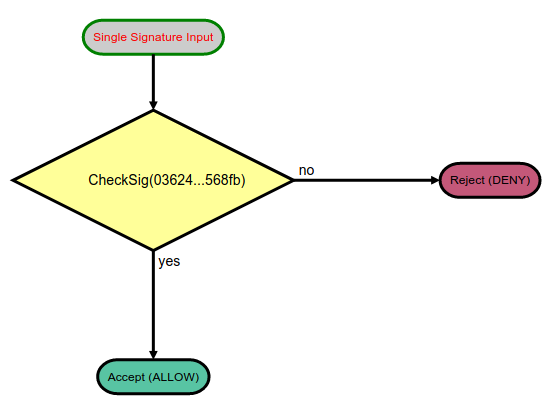
Definition starts with standard, and smacco-1.0 has two input_type: single or multi.
We start with input_type single, which means that a single signature is received as input parameter.
The field pubkey_list declares the used keys for public key criptography.
Note
Neo uses NIST P-256 secp256r1 elliptic curve cryptography. See project libcrypton for more information.
The goal of the generated verification contract is to return a boolean (true/false) response,
when a matching signature is provided.
We then explore rule section.
Understanding Rules
Every smart account is composed by one or more rules, that govern the behavior of the contract. Smacco provides two fields:
rule: when a single rule is used (the simplest form)rules: when multiple rules are used
Each rule is divided in two parts: rule_type and condition.
A rule_type can be:
ALLOW_IF: directly accepts operation (returns true) if condition is satisfiedDENY_IF: directly rejects operation (returns false) if condition is not satisfied
Every condition has a condition_type in many formats, including:
CHECKSIG: checks a single signature parameter against public keyCHECKMULTISIG: checks an array of signatures as parameter against an array of public keysand many others… note that details are not given at this point, let’s move on
Default Rule and Inlining
It’s important to highlight that a default_rule governs the corner cases of the contract, and can be:
DENY_ALL: standard option, if no rule explicitly accepts, then operation is rejectedACCEPTS_ALL: if no rule explicitly rejects, then operation is accepted
Important
Note that default_rule is only used when "inline_last"="disabled". Since inlining
is enabled by default, we typically don’t use a default_rule.
MultiSig Example
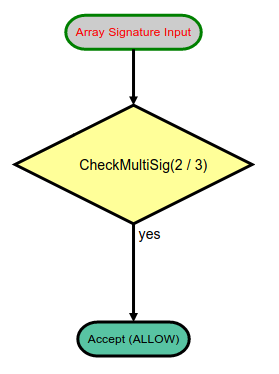
Next example validates a subset of public keys against an array of signatures passed as parameter, known as multisig. This account type is generally used to provide extra security, in two common scenarios:
requiring multiple entities to attach signatures, e.g., a 3/3 multisig (only valid if three-out-of-three sign together)
accepting fallback signatures, if some of them is lost, e.g., a 2/3 multisig (valid if any two-out-of-three sign together)
We provide an example of 2/3 multisig, with default_rule set to DENY_ALL (disabling inlining):
{
    "standard": "smacco-1.0",
    "input_type": "array",
    "pubkey_list": [
        "036245f426b4522e8a2901be6ccc1f71e37dc376726cc6665d80c5997e240568fb",
        "0303897394935bb5418b1c1c4cf35513e276c6bd313ddd1330f113ec3dc34fbd0d",
        "02e2baf21e36df2007189d05b9e682f4192a101dcdf07eed7d6313625a930874b4"
    ],
    "rule": {
        "rule_type": "ALLOW_IF",
        "condition": {
        "condition_type": "CHECKMULTISIG",
        "minimum_required": "2"
        }
    },
    "default_rule" : "DENY_ALL"
}
And the corresponding C# smart contract:
using Neo.SmartContract.Framework;
using Neo.SmartContract.Framework.Services.Neo;
using Neo.SmartContract.Framework.Services.System;
namespace NeoContract1 {
public class Contract1 : SmartContract {
    public static readonly byte[] pubkey_0 = "036245f426b4522e8a2901be6ccc1f71e37dc376726cc6665d80c5997e240568fb".HexToBytes();
    public static readonly byte[] pubkey_1 = "0303897394935bb5418b1c1c4cf35513e276c6bd313ddd1330f113ec3dc34fbd0d".HexToBytes();
    public static readonly byte[] pubkey_2 = "02e2baf21e36df2007189d05b9e682f4192a101dcdf07eed7d6313625a930874b4".HexToBytes();
    public static bool CheckMultiSig2_3(byte[][] signatures){
        byte[][] vpub = new[] {pubkey_0, pubkey_1, pubkey_2};
        byte[][] vsig = new[] {signatures[0], signatures[1]};
        return VerifySignatures(vsig, vpub);
    }
    public static bool Main(byte[][] signatures) {
        if(CheckMultiSig2_3(signatures))
            return true;
        return false;
    }
}
}
Hint
The online platform already compiles C# code using NeoCompiler Eco infrastructure.
Platform also generates the following diagram:
Timelock Contract
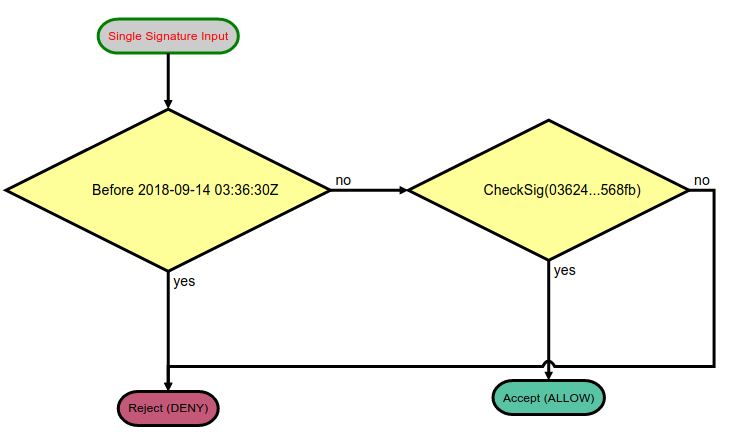
One of the most powerful capability of Smacco is to easily generate timelock accounts. Many blockchain projects rely on time locks to enforce token governance, disabling any possible operation before or after a given time.
We provide an example of a timelock until timestamp 1536896190 (09/14/2018 @ 3:36am UTC):
{
    "standard": "smacco-1.0",
    "input_type": "single",
    "pubkey_list": [
        "036245f426b4522e8a2901be6ccc1f71e37dc376726cc6665d80c5997e240568fb"
    ],
    "rules": [
        {
            "rule_type": "DENY_IF",
            "condition": {
                "condition_type": "TIMESTAMP_LESS",
                "timestamp": "1536896190"
            }
        },
        {
            "rule_type": "ALLOW_IF",
            "condition": {
                "condition_type": "CHECKSIG"
            }
        }
    ]
}
And the corresponding C# smart contract:
using Neo.SmartContract.Framework;
using Neo.SmartContract.Framework.Services.Neo;
using Neo.SmartContract.Framework.Services.System;
namespace NeoContract1 {
public class Contract1 : SmartContract {
    public static readonly byte[] pubkey_0 = "036245f426b4522e8a2901be6ccc1f71e37dc376726cc6665d80c5997e240568fb".HexToBytes();
    public static bool Main(byte[] signature) {
        if(Blockchain.GetHeader(Blockchain.GetHeight()).Timestamp < 1536896190)
            return false;
        return (VerifySignature(signature, pubkey_0));
    }
}
}
Hint
The online platform already compiles C# code using NeoCompiler Eco infrastructure.
Platform also generates the following diagram:
Logic Operations
Conditions can also be combined by means of logic AND/OR operations.
For example, by giving two pubkeys as parameter, we can use OR to make a choice between them:
{
    "rule_type": "ALLOW_IF",
    "condition" : {
        "condition_type" : "OR",
        "conditions" : [
            {
                "condition_type" : "CHECKSIG",
                "pubkey" : "0"
            },
            {
                "condition_type" : "CHECKSIG",
                "pubkey" : "1"
            }
        ]
    }
}
Hint
The above example is equivalent to a 1/2 MultiSig. Practice a little bit and try that!
Available Conditions
We present a short list of available conditions.
Warning
This list is very likely to be incomplete! If more information is needed, open an Issue for
a discussion on GitHub, or inspect the source code smacco.js to find out more details.
Conditions and subfields:
AND: performs logic ANDconditions: json list of conditions to perform AND
OR: performs logic ORconditions: json list of conditions to perform OR
CHECKSIG: performs CHECKSIG to validate default or explicit pubkeypubkey: explicit pubkey index (defaults to 0)
CHECKMULTISIG: performs CHECKMULTISIG X/Ypubkeys: list of public keys to check (value Y). Defaults to globalpubkey_list.minimum_required: value X of X/Y multisigsignatures: explicit index of signatures passed as array to contract. Length of list replaces minimum_required.condition_name: name of condition (affects C# function name)
TIMESTAMP_LESS: check if timestamp is less than a given valuetimestamp: explicit time value in timestamp formatutc: explicit time value in utc format
TIMESTAMP_GREATER: check if timestamp is greater than a given valuetimestamp: explicit time value in timestamp formatutc: explicit time value in utc format
SELF_TRANSFER: check if transaction is a self-transfer (destination is same as source)ONLY_NEO: check if only NEO asset is being transferredONLY_GAS: check if only GAS asset is being transferred
Interesting examples of each of these options are presented on file smacco.test.js.